Skip to content

  • Home
  • Blog
  • Tutorials
  • Forum
  • Start Creating
  • Our 2013 Halloween Photo Editing Contest is here!
    Uncategorized

    Our 2013 Halloween Photo Editing Contest is here!

    ByRibbet October 24, 2013February 22, 2022

    Read More Our 2013 Halloween Photo Editing Contest is here!Continue

  • Improvements to Collage, Image Quality & More
    Announcements | New Features

    Improvements to Collage, Image Quality & More

    ByRibbet October 23, 2013February 22, 2022

    We’ve just released a new Ribbet version with some important improvements to collage, image quality & more! – Fine-tune your collages with rotate, flip, zoom and clear cell – Improved quality of images in collages, images saved to Facebook, Flickr and Picasa/Google+, and images dragged from the Photo Basket – Improved EXIF support for correct…

    Read More Improvements to Collage, Image Quality & MoreContinue

  • Over 75 Fonts added and new Tilt-shift effect
    Announcements | New Features

    Over 75 Fonts added and new Tilt-shift effect

    ByRibbet August 22, 2013February 22, 2022

    New Ribbet version! We’ve added over 75 contemporary, high-quality fonts, a new Tilt-shift effect, and various bug fixes.

    Read More Over 75 Fonts added and new Tilt-shift effectContinue

  • Improved Look, New effects & Collage size presets
    Announcements | New Features

    Improved Look, New effects & Collage size presets

    ByRibbet August 7, 2013February 22, 2022

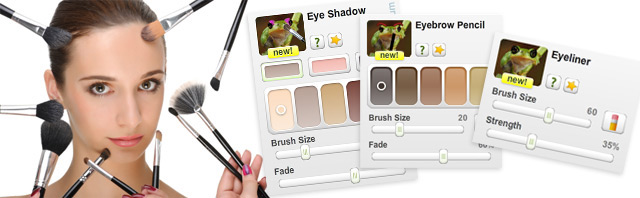
    We’re very excited to announce that we’ve launched a new Ribbet version! Here’s what’s included: – Improved look and feel with a cleaner, easier to use interface – 3 new touchup effects: Eyeliner, Eyebrow Pencil and Eye Shadow – New size presets for collages, blank canvas and cropping, making printing at various sizes and creating…

    Read More Improved Look, New effects & Collage size presetsContinue

  • Favorites Tab, Picasa Web & New Effects
    Announcements | New Features

    Favorites Tab, Picasa Web & New Effects

    ByRibbet June 19, 2013February 22, 2022

    We’ve just launched the latest Ribbet version with some of the best features yet! – Favorite your most loved Ribbet effects, stickers, frames & seasonals to keep them shortlisted on your Favorites tab – Google+, Picasa Web and Blogger integration: Edit, save, optionally replace and create collages directly from these services (connect via Picasa, Google+…

    Read More Favorites Tab, Picasa Web & New EffectsContinue

  • Worldly Filters, Plastic Surgery & Blank Canvas
    Announcements | New Features

    Worldly Filters, Plastic Surgery & Blank Canvas

    ByRibbet March 6, 2013February 22, 2022

    Today we’ve launched more exciting new features: – 5 new Worldly Filters: Add sophisticated, classic tones in a single click. Each filter brings out the color of the place it’s named after – Plastic Surgery: Create touch-ups like never before with our Digital Scalpel, Botox and Lipo – Blank Canvas: Now you can start from…

    Read More Worldly Filters, Plastic Surgery & Blank CanvasContinue

  • True Vintage
    Announcements | New Features

    True Vintage

    ByRibbet February 27, 2013February 22, 2022

    Create authentic vintage-looking photos with True Vintage. It’s like 50 vintage cameras plus your own private dark room.


    Read More True VintageContinue

Page navigation

Previous PagePrevious 1 … 12 13 14 15 16 Next PageNext

Recent Posts

  • Bulk Editor – BETA invite & Release notes
  • Have your Product photos stand out on ETSY
  • Adjustment Tools: How to Sharpen your Pet’s Photos
  • Ribbet Guide to Photography: How to do a Boho themed Family Photo
  • Ribbet announces the 3 winners of its 2023 Emerging Photographer Competition!

Recent Comments

  • zuzubird on Have your Product photos stand out on ETSY
  • zuzubird on How to change the Canvas color
  • Ribbet on How to change the Canvas color
  • zuzubird on How to change the Canvas color
  • Olivia on Ribbet launches Ribbet.ai, a suite of free AI-powered photo editing tools

Archives

Categories

© 2026 Ribbet

Cleantalk Pixel
  • Home
  • Blog
  • Tutorials
  • Forum
  • Start Creating